Black Friday: 40% off R2M. Lifetime: €59.40 instead of €99
Yearly: €17.40 for the first year

Rhino and Blender files, straight into 3ds Max.

Use code BLACKR2M

Offer ends in 00 days 00 hours 00 mins 00 secs

Until 7 December 2026

Per seat, plus VAT. Yearly renews at €29. Monthly not included. 14-day trial first, no limits.

The Rhinoand Blender! importer3ds Max never had.With live link.

Import the architect's .3dm straight in 3ds Max, without owning Rhino. No FBX, OBJ or DWG in between. When they send a new version, re-sync and keep your modifiers, materials and scatter setups.

One way to bring Rhino models into 3ds Max, on every workstation. Buy the seats you need and add your artists by email: each one signs in and gets a seat. Textures are written where render nodes find them.

14-day trial, no cardR2M 0.5.55 · 27.3 MB3ds Max · Windows 10/11
Product presentation · 1:21

See R2M in action.

From a Rhino model to a 3ds Max scene · no export needed

1.7 minutes to import a 1.7 GB model, in the time it takes to make coffee.

35,000 Rhino objects and 18M triangles, with layers, cameras, materials and UV mapping. Nothing exported from Rhino.

0

Exports from Rhino

No FBX, OBJ or DWG. Rhino can stay closed, or not be installed at all.

FBXOBJDWG
2021–2027

3ds Max versions

One installer.

2021202220232024202520262027
5–9

Rhino file versions

Local or on a network share.

56789
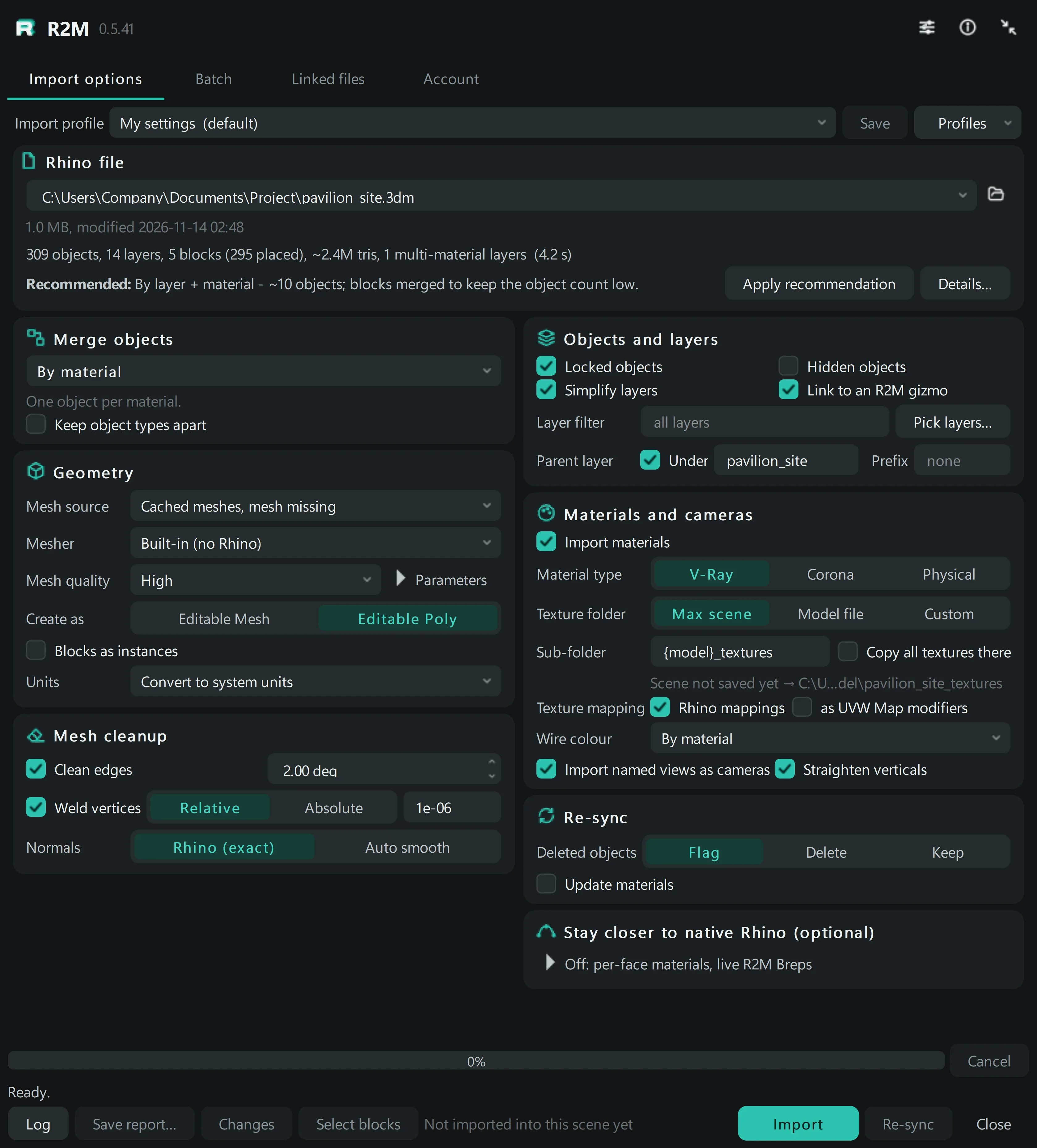
Import

An efficient scene with materials and cameras, not 20,000 loose objects.

Pick a file and R2M scans it in the background, then recommends a setup: merge mode, which blocks stay instances, which mesher. Apply it, or use your own profile.

  • One mesh per material or layer. Welded Editable Poly with Rhino's own normals.
  • Everything in place: layers, names, cameras, and V-Ray, Corona or Physical materials.
  • No Rhino required. Files saved small or never shaded are meshed by R2M itself.
Animated tour built on a real capture of the R2M dialog (Polished style, dark).
Re-sync

Last minute model change? Re-sync.

Import the updated .3dm into the same scene. R2M matches every object by its Rhino ID and only touches what changed.

  • Changed objects get new geometry in place. Modifiers, materials, transforms and renderer properties stay.
  • References stay too, a Forest Pack surface for example.
  • Deleted objects are hidden on layer R2M_Deleted, or removed if you prefer.
  • New import options? R2M counts what would be replaced and asks first.
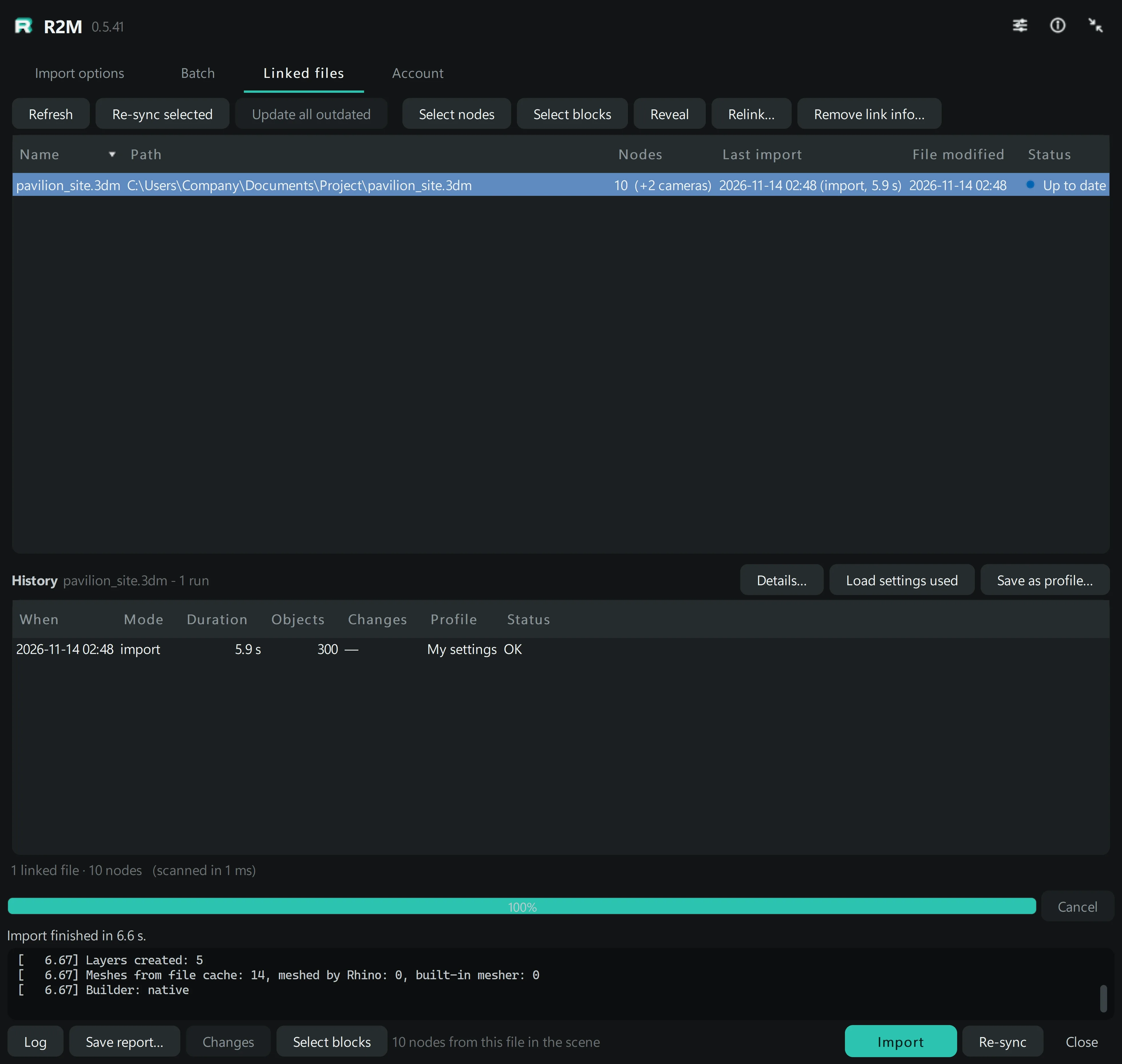
Linked files

Know what's in the scene and where it came from.

Every .3dm in the scene with its objects, last import and status. The history of every import and re-sync is saved in the .max file.

  • Update all outdated files in one go.
  • Reload the settings of any earlier import, or save them as a profile.
Batch

A folder of models, auto-converted while you do something else.

Add files or drop a whole folder. Import them all into one scene, or save one .max per model with its textures next to it.

  • A failed file doesn't stop the rest.
  • Check first: see what changed in each file, then re-sync one or all.
AI assistants · MCP New

Just ask.

“Import these files with R2M.” Claude does the rest.

R2M comes with an MCP server, so Claude Code, Claude Desktop or another AI assistant can run it in your open 3ds Max: imports, batch conversions, checks and re-syncs.

  • Whole folders in one request. Into this scene, or one .max file per model.
  • Your profiles, your options. The assistant uses your R2M profiles, or the options you name.
  • It stops before it replaces. A re-sync that would replace objects waits until you say yes. Unsaved work is never thrown away.
  • Runs in the R2M dialog, with the progress bar, log and Cancel button you know. R2M accepts connections from your own PC only.

Set it up in one line

Tested with Claude Code and 3ds Max 2026. Needs R2M 0.5.55 or newer.

Claude Code · r2m (example)

Import every .3dm in D:\Projects\Tower into this scene. Use my Studio profile.

r2m_import 4 files · profile Studio · into the open scene

  • Tower_Core.3dmdone312 objects · 8.4 s
  • Tower_Facade.3dmdone96 objects · 11.2 s
  • Podium.3dmdone141 objects · 5.7 s
  • Landscape.3dmre-syncedalready in the scene · 3 updated, 1 added

Done. Three files imported in 25 s. Landscape.3dm was already in the scene, so I re-synced it instead of importing it twice.

Blender New

Blender files open the same way.

Pick a .blend in the R2M dialog. No FBX or Alembic export: the scene arrives with its collections, instances, materials and cameras, and Re-sync keeps it up to date.

Read the Blender guide

Tested with Blender 3.6 and 5.2.

What a Blender file becomes in 3ds Max
In BlenderIn 3ds Max
CollectionsLayersone layer per collection
InstancesInstancesone mesh, many placements
Principled BSDFVRayMtl, Corona or Physicalyour choice of renderer
CamerasCameras
Modifiers, geometry nodesAppliedwhen Blender is installed
Object namesNode namesused to match objects on Re-sync
Blender 3.6 or 5.2 installed

The scene as it renders.

R2M runs Blender in the background, so modifiers and geometry nodes come in applied. Blender is free; R2M only borrows it.

No Blender on this PC

R2M reads the file itself.

Objects come in as their base meshes, before modifiers. Curves and text are skipped.

Re-sync

Changed in Blender? Re-sync.

Objects are matched by their Blender name, so a renamed object counts as deleted plus new. Lights are not imported.

Speed

Blazing fast.

R2M builds geometry in C++, not a script loop. Render meshes are read on all cores while the file's tables load, and merging, welding and edge cleanup run in parallel.

1.7min

from a 1.7 GB Rhino model to a 3ds Max scene, with cameras, materials and UV mapping. The same file through an OBJ export and import takes 14.2 minutes and comes without them.

Building the geometry in Max1.02M triangles · 2,000 objects · normals and UVs
R2M C++ builder
0.30 s
MAXScript builder
4.10 s
Per-vertex Python
12.1 s
What ends up in the scenethe same 1.7 GB file · objects to manage in 3ds Max
R2M
183
Rhino objects in the file
35,000
OBJ, Max OBJ importer
37,433
1.2 s

for 10,000 block instances, created as real Max instances.

0.1 s

start-up of the built-in mesher. Starting Rhino cold takes 5 to 12 s.

116 → 51 s

a 27.9 million triangle stress file, before and after.

Measured by R2M’s creators in 3ds Max on one workstation (AMD Ryzen 9 5950X, 16 cores, 128 GB RAM), November 2026. Top: each step run once, R2M 0.5.34 with its default settings. Geometry build: synthetic scene, best run in batch mode. These are our own test results: yours will vary with the file, CPU, disk and network.

What arrives in Max

A mirror of your Rhino file.

Layers, names, blocks and materials come across as Max objects you can work with. Every node keeps its Rhino ID, so the scene can be updated later.

Layers and blocksThe structure of the Rhino file, kept as it is or simplified.

Nested layers, kept or tidied

Keep Rhino's layer tree as it is, with names, nesting, visibility and colours. Or tidy it up: empty layers are skipped, a filter leaves out whole branches, and merging by material leaves far fewer layers.

Rhino · Layers
  • Building
  • Facade
  • Glazing
  • Mullions
  • Slabs
  • Furniture
  • Site (hidden)
3ds Max · Layers
  • Building
  • Facade
  • Glazing
  • Mullions
  • Slabs
  • Furniture
  • Site (hidden)

Blocks: merged, or instances. Your choice.

Merge block geometry into the meshes around it for the lightest scene. Or keep blocks as real Max instances, nested ones too. Smart merge decides per block.

Chair × 16 → 1 mesh, 16 instances

Merging and meshesFewer, cleaner objects, without losing what they are.

Heavy files, light scenes

One mesh per material or layer, never mixing materials. Smart merge keeps heavy blocks as instances: 332 objects from the same file.

20,094 → 82

Rhino objects in, Max meshes out, one 1.1 GB production file. Our own test; results vary by file.

Trained on real files to recognize what it's merging

The merge engine is trained to recognise classes of objects and keeps them apart. Different kinds of things never end up in the same mesh, so you can still select, hide and replace them by type.

Clean meshes

Welded, with Rhino's own normals. Coplanar triangles are cleaned back into the polygons you modeled, so the wireframe reads like the design. Editable Poly by default.

Materials and texturesConverted for your renderer, with the bitmaps found.

Materials for V-Ray, Corona or Physical

Rhino materials, PBR included, become VRayMtl, CoronaPhysicalMtl or Physical Material. Per-face materials become Multi/Sub. Objects without a material get their layer colour.

Glass (Rhino PBR)VRayMtl
Oak floor + bitmapVRayMtl + VRayBitmap
Layer "Slabs" colourVRayMtl "Slabs"
3 face materialsMulti/Sub (3)

Embedded textures, found

Bitmaps embedded in the .3dm are extracted next to your scene, where render nodes find them. Broken paths are also searched next to the .3dm and in its sub-folders.

tower.maxyour scene
tower_textures\written by R2M
oak_floor.jpgfrom the .3dm
concrete_bump.pngfrom the .3dm

21 textures extracted from one production .3dm. Our own test; results vary by file.

Mapping, cameras, unitsThe details that usually need fixing by hand.

Texture mappings

Planar, box, cylindrical and spherical mappings are computed like Rhino does, on the same map channels. Optionally as editable UVW Map modifiers.

Named views, as cameras

V-Ray, Corona or Physical cameras with Rhino's lens and aspect. Verticals can be straightened for two-point perspective.

Units, handled

Model units are converted to your system units. Or force mm, cm, m, inches or feet. Objects far from the origin keep their precision.

Settings profilesFile > Import entryLayer filterHidden and locked objectsWire colours by material or layerLive Breps, optionalProgress bar and reportOne-click updates
Under the hood

Why it's fast, and why the meshes are squeaky clean.

3ds Max has no .3dm importer of its own, so the usual route is exporting FBX or OBJ from Rhino every time the model changes. R2M reads the file instead and meshes whatever Rhino didn't save.

Your Rhino file

Read directly and in parallel. Network shares are read in place, without a temp copy.

Rhino 5 to 9 fileslocal or network
Already in the file

Cached render meshes

Rhino saves them when you shade a view. R2M reads them on all cores. Nothing to compute.

No Rhino needed

R2M built-in mesher

Starts in 0.1 s. Every Brep edge is sampled once and shared by both faces, so surfaces meet without gaps.

Optional

Your Rhino, headless

R2M runs your installed Rhino in the background, without a window.

3ds Max

C++ builder

Geometry is written straight into Editable Mesh or Poly against the Max SDK. Weld and edge cleanup run on all cores.

On every node Rhino ID

Each object keeps its Rhino ID. That makes re-sync exact, instead of guessing by name.

Mesher setting in the R2M dialog:Quality presets: draft, medium, high, file settings, custom.
Compatibility

Works with your setup.

One installer. Nothing to set up in 3ds Max or Rhino.

Software
3ds Max2021 to 2027, Windows
Rhino files.3dm from Rhino 5 to 9
Blender files New.blend, tested with Blender 3.6 and 5.2. Collections, instances, materials and cameras come in; re-sync works too.
Renderers · materials and cameras
V-RayVRayMtl, V-Ray cameras
CoronaCoronaPhysicalMtl, cameras
PhysicalPhysical Material, cameras
Scatter plugins
Forest Pack, RailClonereferences survive a re-sync
In RhinoIn 3ds Max
Breps, extrusions, surfaces, SubD, meshesEditable Poly or Editable Mesh. Welded; coplanar triangles cleaned back into polygons.
Nested layersNested layers with names, colours and visibility, or a simplified tree.
BlocksInstances, or merged into the meshes. Smart merge decides per block.
Materials, PBR and per-face includedV-Ray, Corona or Physical. Multi/Sub with material IDs.
Embedded texturesExtracted next to the .max, so render nodes find them.
Texture mappingsRhino mapping channel 1, 2, 3 becomes map channel 1, 2, 3. Optional UVW Map modifiers.
Named views, unitsCameras with Rhino's lens. Units converted to system units.
Object names and IDsNode names, and the Rhino ID stored on every node for re-sync.
Who it's for

One seat or a whole studio.

One seat · from €9 a month + VAT

Freelancers

You get the client's Rhino file, not a Rhino licence.

  • No Rhino needed: the built-in mesher handles files that were never shaded
  • €9 a month + VAT for a single project, cancel any time. Or €99 once.
  • Move your seat between workstation and laptop from inside 3ds Max
  • Scenes you made always open and render, licence or not
  • Your model never leaves your machine
As many seats as you need · one invoice

Studios

The same result on every workstation and every render node.

  • Manage your team: add or remove artists by email, from your account or inside 3ds Max. They sign in and use your seats.
  • Settings profiles can be exported as a file and imported by a colleague
  • Textures are written next to the .max, not on one artist's PC
  • One installer for every 3ds Max version from 2021 to 2027
  • Batch conversion, and a saved import history in every scene
  • Any number of seats in one order; the invoice goes to your company with its VAT number
Why this exists · a note from the creators

Most of our projects start as a Rhino model that keeps changing until the very last minute.

For years every revision meant export, import, clean up - hours, days, months wasted.

R2M is the importer we’ve always wished we had.

R2MR2MR2MR2MPanoptikonarchviz studio, makers of R2M
20,094Rhino objects in one production file
82objects in the 3ds Max scene
27–29 sfor the whole import, from a local disk

Measured by R2M’s creators in their own tests. Your results will vary with the file and your hardware.

Pricing

Per seat. Pay monthly, yearly or once.

Seats
1

Monthly

€9/ month + VAT

For a single project. Cancel any time.

1 seat

  • Every feature and update
  • One machine per seat at a time
Best value

Yearly

€29/ year + VAT

€2.42 a month, 73% less than paying monthly. Cancel any time.

1 seat

  • Every feature and update
  • One machine per seat at a time

Lifetime

€99once + VAT

One payment. Updates included.

1 seat

  • Every feature and update
  • One machine per seat at a time
Prices in EUR, per seat, excluding VAT.Paddle, our reseller, adds VAT or sales tax where it applies and emails the invoice.Opening and rendering scenes never needs a seat.Bought several seats? Add your team by email; each member signs in and uses a seat.Refunds within 14 days of your first purchase.
FAQ

Questions.

Can 3ds Max open Rhino .3dm files?

Not on its own: 3ds Max has no .3dm importer, so the usual route is exporting FBX, OBJ or DWG from Rhino. With R2M installed, 3ds Max reads the .3dm directly, from the R2M menu or File > Import.

Do I need Rhino installed?

No. R2M reads the .3dm itself. Objects saved without render meshes are meshed by R2M's built-in mesher. If Rhino 8 or newer is installed, you can mesh with Rhino instead.

How is R2M different from exporting FBX or OBJ from Rhino?

Nothing is exported and Rhino can stay closed. Layers, blocks, materials, texture mappings and cameras arrive with the geometry, and a later Re-sync updates the scene in place. In our own test on a 1.7 GB model, R2M took 1.7 minutes and made 183 meshes with layers, materials and cameras; an OBJ export and import took 14.2 minutes and made 37,433 loose meshes. Results vary with the file and the hardware.

Which versions of 3ds Max and Rhino are supported?

3ds Max 2021 to 2027 on Windows. R2M reads .3dm files from Rhino 5 to Rhino 9. The optional Rhino mesher needs Rhino 8 or newer.

What hardware do I need?

Any PC that runs 3ds Max 2021 to 2027 well. We recommend 32 GB of RAM and a processor with 8 or more cores (Intel Core i7 12th gen, AMD Ryzen 7 5000 or newer), with an SSD; 16 GB and 4 cores is the minimum. For .3dm files over 1 GB, 64 GB of RAM and 12 to 16 cores. R2M does not use the graphics card. See what you need.

Can R2M import Blender files?

Yes, since R2M 0.5.45: pick a .blend file in the R2M dialog. It is tested with Blender 3.6 and 5.2. With one of them installed (Blender is free), R2M runs it in the background and imports the scene as it renders, with modifiers and geometry nodes applied. Without Blender, R2M reads the .blend itself: objects come in as their base meshes, and curves and text are skipped. Collections become layers, instances stay instances, Principled materials become V-Ray, Corona or Physical materials, cameras come in, and Re-sync works. Lights are not imported.

Can an AI assistant use R2M?

Yes, since R2M 0.5.55. Its MCP server lets Claude Code, Claude Desktop or another MCP client import files, convert them to .max files and re-sync them in a running 3ds Max. Setup is one line: see Use R2M from an AI assistant. Tested with Claude Code and 3ds Max 2026.

Does it work on a Mac?

No. 3ds Max only runs on Windows, so R2M is Windows-only. The .3dm can come from Rhino for Mac.

Which renderers are supported?

V-Ray, Corona and the 3ds Max Physical Material, for materials and for cameras.

Can I update the scene when the Rhino model changes?

Yes, with Re-sync. R2M matches objects by their Rhino ID. Changed objects get new geometry in place and keep the materials, modifiers and transforms you added in Max. New objects are added. Deleted objects are hidden on the layer R2M_Deleted, or removed if you prefer.

What happens to my scenes when the trial or subscription ends?

Import and Re-sync stop until you have a licence again. Scenes you already imported open and render as before: imported objects are ordinary Editable Poly or Editable Mesh objects.

How do seats work?

One seat runs R2M on one machine at a time. To move a seat, release the machine from inside 3ds Max, up to 5 moves per 30 days. If you buy several seats, you can add colleagues by email from your account or from inside 3ds Max; they sign in with that email and use your seats.

Does R2M need an internet connection?

Only to sign in and to check the licence, about once a day. After a check it keeps working offline for up to 14 days, 30 on lifetime licences.

Do I have to update R2M?

Yes, if you run R2M 0.5.39 or older. From 27 November 2026 those versions ask to be updated before they can renew their licence. R2M 0.5.40 and newer are not affected. To update, use About > Check for updates in the R2M dialog, or download the installer and run it. Scenes you already imported open and render as before.

Is my model uploaded anywhere?

No. Reading, meshing and building run on your machine. The licence check sends your account, a hashed machine ID, the machine name and version numbers. Usage and error reports are sent only if you agree (R2M asks the first time, and you can change it in About): the file name, size, timings and errors, never the folder or the file itself.

How fast is it on my files?

It depends on the file and the machine. Try your heaviest file during the trial.

Who handles payment, VAT and invoices?

Paddle.com is our reseller and merchant of record. Prices exclude VAT: Paddle processes the payment, adds VAT or sales tax on top where it applies and emails the invoice. Monthly and yearly plans can be cancelled at any time.

Can I get a refund?

Yes, within 14 days of your first purchase. See the refund policy.

Free trial, no limitations.

14 days, every feature, no cardR2M 0.5.553ds Max 2021–2027 · Windows 10/11

* For a limited time after launch.